YouTube public views, a video ad metric in Google Ads reporting, now include estimated co-viewing when an ad plays on a TV screen, according to Google's help page About YouTube ads and view metrics. Google updated the page in a change The PPC Times detected on November 16, 2026. TrueView views, the metric advertisers pay for with cost-per-view bidding, do not include co-viewers. Advertisers running video campaigns on TV screens may now see more YouTube public views than impressions.
A separate YouTube Help page, Understand your YouTube content performance, states that beginning November 2026, public view counts on video watch pages incorporate co-views by estimating the number of individual viewers watching together on TV screens.
How does TV co-viewing change YouTube public views in Google Ads?
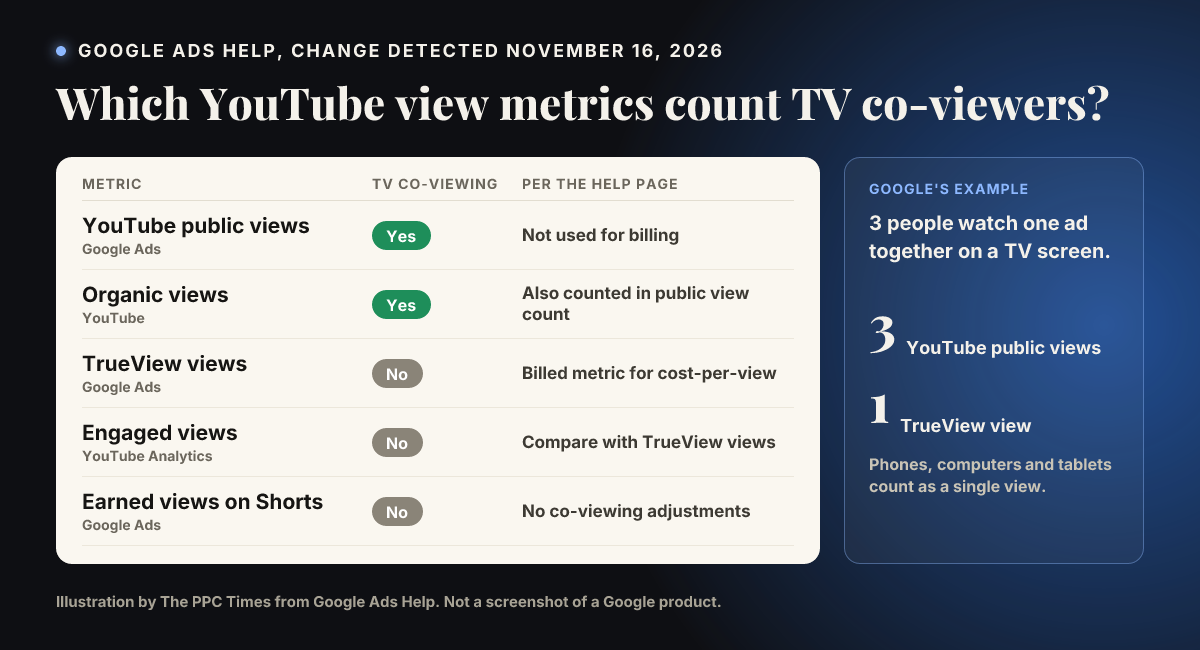
The Google Ads help page now explains that when a video ad plays on a TV screen, YouTube public views count the estimated number of people watching together in the room. Google's own example: 3 viewers watching an ad together on a TV count as 3 public views. Playbacks on phones, computers and tablets still count as a single view. The page adds that YouTube public views may therefore be higher than impressions for campaigns serving on TV screens.
What the help page now says about each view metric:
- YouTube public views (Google Ads): include estimated co-viewing on TV screens. The page says Google does not bill YouTube ads campaigns on public views.
- Organic views: also include estimated co-viewing on TV screens, so the public view count on a video's watch page (organic views plus ad public views) does too.
- TrueView views (Google Ads): exclude estimated co-viewing. Each qualifying ad playback on a device counts as one TrueView view, "which means you never pay for additional co-viewers," according to Google.
- Engaged views (YouTube Analytics): exclude estimated co-viewing. The page names these as the equivalent of TrueView views when comparing the two platforms.
- Earned views on YouTube Shorts: counted after 10 seconds "without co-viewing adjustments", while organic Shorts views are counted as soon as the video starts to play or replays and include estimated co-viewing on TV screens.
Before the update, the page's note on public views explained only the difference between YouTube public views and the public view count. Its earned views line said an earned view on Shorts is counted after 10 seconds and an organic view as soon as the video starts to play or replays. Neither mentioned co-viewing.
For comparisons between Google Ads and YouTube Analytics, the page says the Views metric on the "YouTube advertising" row of the traffic sources report reflects YouTube public views, and both include TV co-viewing. To look at views without TV co-viewing, it points to Engaged views or the Co-view rate metric in YouTube Analytics Advanced Mode. The YouTube Help page describes the co-view rate as a metric you can divide total views by to get baseline views without co-viewers.
Why it matters for advertisers
YouTube public views could rise for campaigns with a lot of TV delivery even if nothing about the campaign has changed. Anyone reporting public views to clients, or comparing them with impressions to judge reach, could see figures that are not comparable with earlier periods. Billing is a different matter: the help page states that TrueView views, which drive cost-per-view charges, stay at one per playback.
A public view count above impressions could previously have looked like a reporting error. On campaigns serving on TV screens, the page now says it can happen.
What to do now
- Use TrueView views (or Engaged views in YouTube Analytics) for cost and performance comparisons over time, since neither includes co-viewing.
- If you report YouTube public views, add a note on dashboards for November 2026 onward, and consider splitting results by device to see how much comes from TV screens.
- When matching Google Ads with YouTube Analytics, compare TrueView views with Engaged views, and public views with Views on the "YouTube advertising" row, as the page describes.
- Check the Co-view rate in YouTube Analytics Advanced Mode to estimate how much of a view count comes from co-viewers.