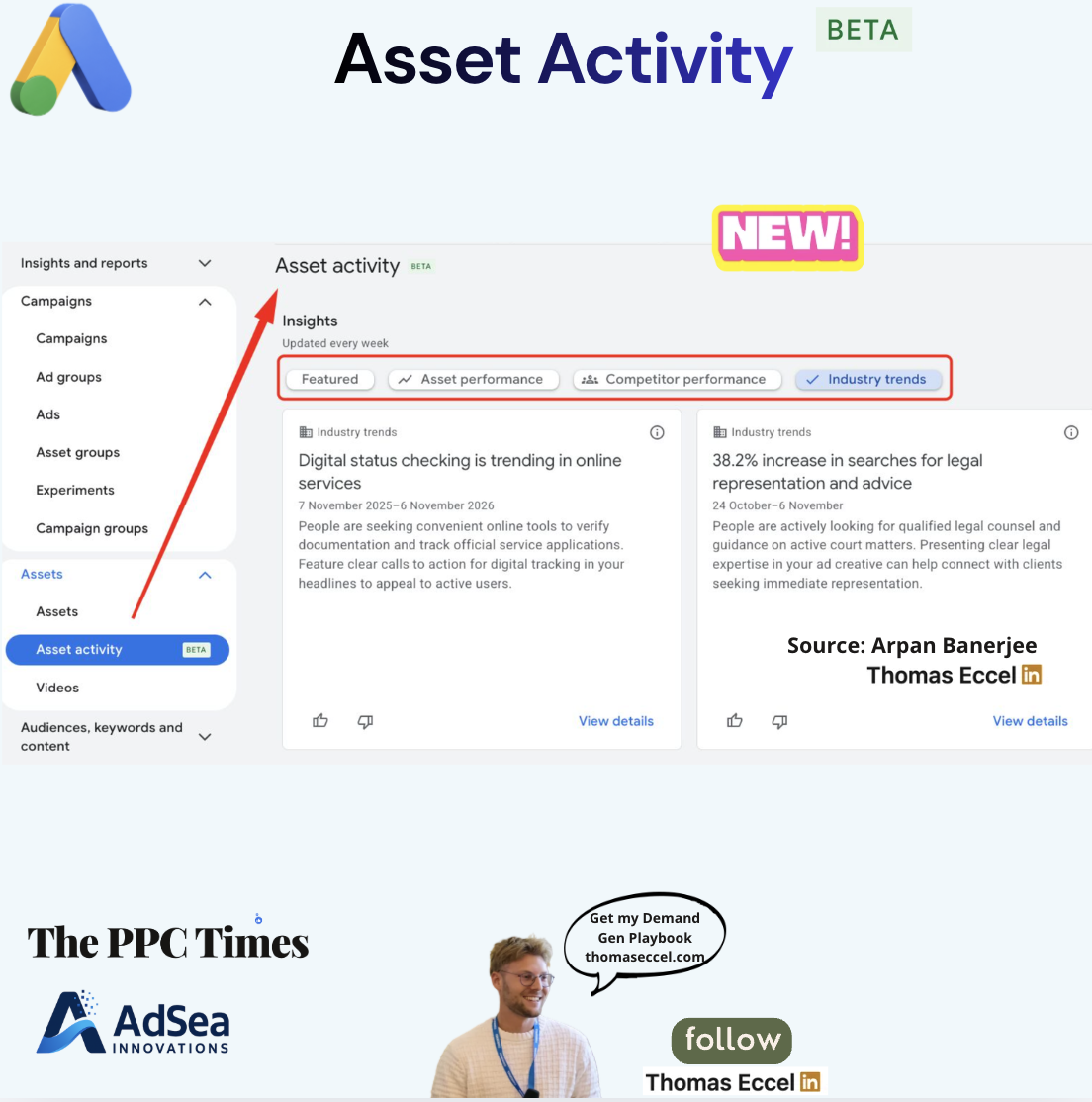
Google Ads is testing a page called Asset activity, labelled beta, that shows weekly insight cards about assets, competitors and industry search trends. Search Engine Roundtable reported the test on November 9, 2026, citing advertisers who spotted it in their accounts, and a screenshot in Thomas Eccel's graphic shows the page. Google has not announced Asset activity, and as of November 14, 2026 the Google Ads help pages we track don't describe it.
Where is Asset activity in Google Ads and what does it show?
In the screenshot, Asset activity sits in the left-hand menu under Campaigns, then Assets, between Assets and Videos, with a beta label. The page has an Insights section marked "Updated every week" and four filters:
- Featured
- Asset performance
- Competitor performance
- Industry trends
Search Engine Roundtable, quoting the advertisers who found it, also lists an Asset diversity category, and describes the page as using Google AI to give information on Google Ads assets.
The screenshot shows two Industry trends cards. Each has a headline, a date range, a short explanation with a suggestion for ad creative, thumbs-up and thumbs-down buttons, and a View details link:
- "38.2% increase in searches for legal representation and advice", for 24 October to 6 November. The card suggests presenting clear legal expertise in ad creative.
- Digital status checking trending in online services, for 7 November 2025 to 6 November 2026. The card suggests clear calls to action for digital tracking in headlines.
These cards come from one account, so the topics and figures reflect that advertiser's industry. They are not market-wide statistics.
Why it matters for advertisers
Until now, finding rising search themes for ad copy usually meant pulling them from search terms reports, Keyword Planner or other tools. Asset activity puts trend cards next to the assets themselves, with a creative suggestion attached, which could speed up headline and description writing.
The competitor tab is likely to draw the most attention, but neither the screenshot nor the report shows what its cards contain. Because the page is a beta test in some accounts, its tabs and card types could change, and many advertisers won't see it yet.
What to do now
- Check your account: open Campaigns, then Assets, and look for Asset activity under Assets. If it's missing, your account is probably not in the test.
- Treat cards as leads: before writing new headlines from an Industry trends card, check the trend against your own search terms report.
- Test, don't replace: add copy based on a card as new assets next to your current ones and compare results before removing anything.
- Use the feedback buttons: the thumbs-up and thumbs-down buttons on each card appear to be the way to tell Google which insights are useful.
- Check back weekly: the page says its insights are updated every week.