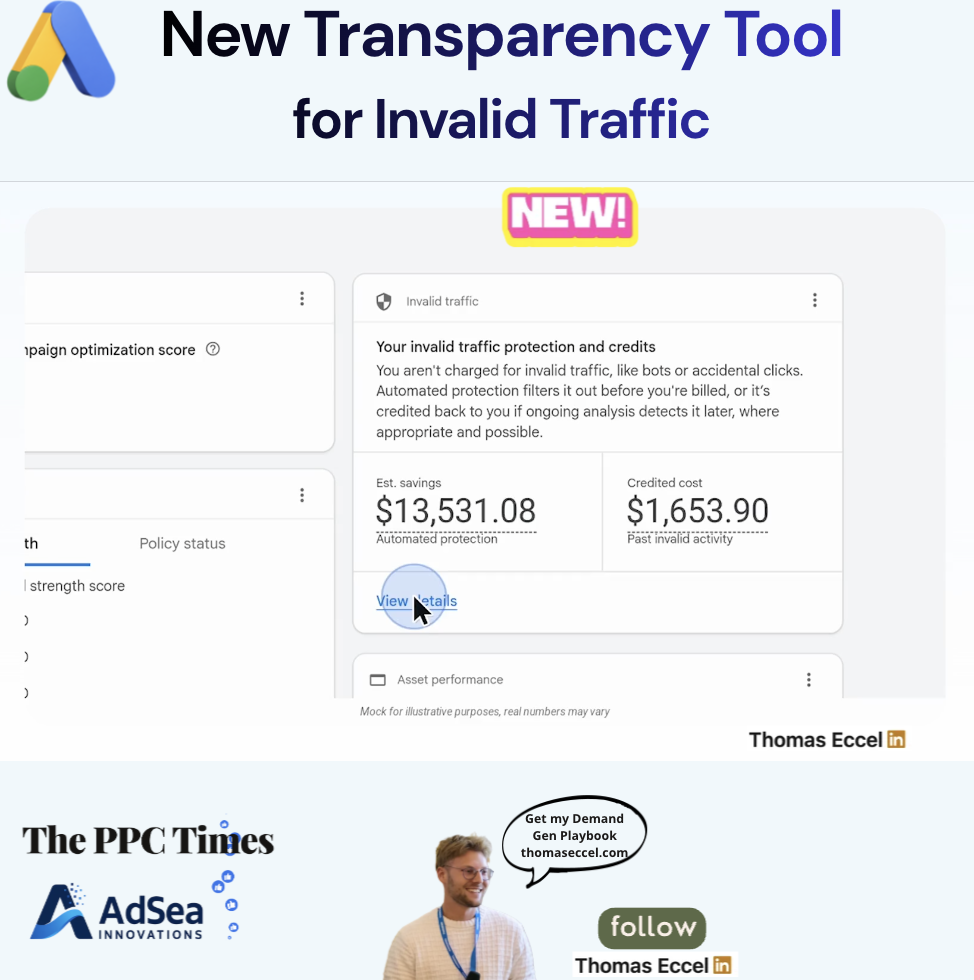
Google Ads began rolling out an Invalid traffic card on the Overview page on November 12, 2026, according to Google's announcement. The card shows advertisers how much their campaigns saved through Google's automated filtering of invalid traffic, such as bots and accidental clicks, and how much Google credited back for invalid activity it found after billing. Google says the card is reaching accounts gradually.
What does the Google Ads Invalid traffic card show?
Google's announcement calls the feature the Invalid Traffic Overview Card. In the account it appears as the "Invalid traffic" card on the Overview page and summarises invalid traffic protection for the date range you select. According to Google's help page on invalid traffic, it has two figures:
- Estimated savings: the estimated cost saved by automated protections, which include automated filters and proactive manual reviews.
- Credited cost: the amount credited back for past invalid activity detected after the billing period ended.
Selecting View details opens a breakdown page with daily graphs, a breakdown across all campaigns and direct links to the invoices that carry past invalid activity credits. The help page notes that the card may not be available in every account yet.
Google already filtered invalid traffic without charging for it. What is new is that advertisers can see the result in the interface. In the announcement, Keerat Sharma, VP and General Manager, Ads Privacy and Safety, writes: "Now, for the first time, businesses can see both the amount saved and the credits we automatically provide for invalid activity."
The announcement also says Google has reduced advertiser exposure to invalid leads by an average of 30% so far in 2026, through continuous system upgrades.
How do savings and credits differ?
The two figures cover different moments, as the help page explains:
- Invalid traffic caught before the end of the billing cycle is removed from billing and from campaign metrics. It shows up in the Invalid clicks column of the campaigns table.
- Invalid traffic found after billing is credited, where appropriate and possible, as an "Invalid activity" adjustment on the next invoice. Campaign metrics are frozen at the end of the month and do not change for these credits.
The help page says it is normal to see many filtered invalid clicks but small credit amounts, because the two numbers are not directly related.
Why it matters for advertisers
Until now, checking how much invalid traffic cost an account meant combining the Invalid clicks column with credit lines on invoices. A single card with a money figure is likely to make these questions easier to answer in client reports and budget reviews.
The card does not answer everything. The help page says Google does not reveal which specific clicks it marked invalid, and that its filters cannot stop invalid traffic from reaching a website or lead form. Advertisers who see fake leads may still need their own form and CRM checks.
What to do now
- Look for the card on the Overview page and set a date range that matches your reporting period. If it is missing, the gradual rollout could be the reason.
- Open View details to see which campaigns account for most of the savings and credits.
- Add the Invalid clicks column to the campaigns table if it isn't there yet, so the filtered volume sits next to cost.
- Use the Invalid Activity Credit Report in Report Editor when you need campaign metrics adjusted for credits.
- Explain the numbers to clients: savings and credits measure different things and will rarely match.