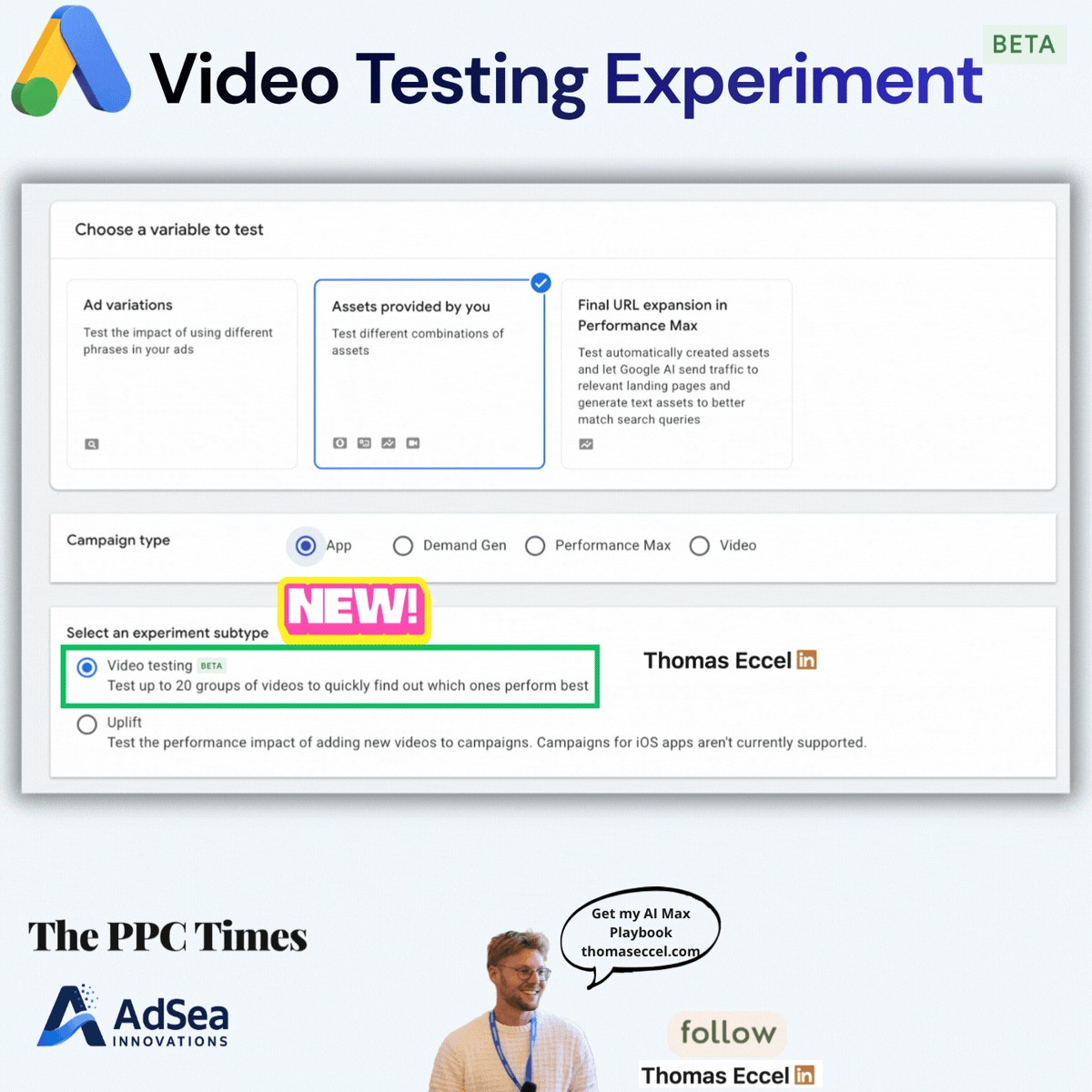
Google Ads is showing a new experiment subtype called Video testing for App campaigns, labelled beta, according to a screenshot of the Google Ads interface by Thomas Eccel, editor of The PPC Times. It appears in Experiments when an advertiser tests "Assets provided by you" and picks App as the campaign type. Google has not announced Video testing, and as of November 12, 2026 its help pages for App campaign experiments don't mention it.
What is the Video testing experiment in Google Ads App campaigns?
In the screenshot, the experiment setup has three steps:
- Choose a variable to test: "Assets provided by you" is selected. The other options are Ad variations and Final URL expansion in Performance Max.
- Campaign type: App is selected. Demand Gen, Performance Max and Video are also listed.
- Select an experiment subtype: two options, Video testing (Beta) and Uplift.
The interface describes Video testing as a way to "Test up to 20 groups of videos to quickly find out which ones perform best".
Uplift is described as testing the performance impact of adding new videos to campaigns, with a note that campaigns for iOS apps aren't currently supported. The screenshot shows no such note for Video testing, and nothing about how results are reported or which accounts can use it.
Google's help page on creating an App asset experiment still lists two experiment types after choosing "Assets provided by you" and App: Directional split and Uplift. Google's App Uplift experiment best practices say Uplift experiments show the performance uplift of adding video assets to an existing campaign, and can also give directional results on how each video contributes.
Why it matters for advertisers
The two subtypes answer different questions. Uplift asks whether adding videos helps a campaign. Video testing, going by its description, compares groups of videos against each other to find the strongest ones.
For app advertisers who produce many video variations, comparing up to 20 groups in one experiment could shorten the cycle of finding which creative to scale. Because the feature is in beta and undocumented, details such as test length, budget split, the metrics used and iOS support are unknown, and they could change before a wider launch.
What to do now
- Check your account: go to Experiments, choose "Assets provided by you", then App, and look for the Video testing subtype. Its absence could mean your account isn't in the beta.
- Group videos by idea: if you have access, build groups around one creative idea each (for example hook, format or length), so a winning group points to something you can repeat.
- Keep Uplift for its own question: use Uplift when you want to know whether more video helps at all, and Video testing when you already run video and want to pick winners.
- Treat early results with care: with no documentation yet, confirm any winner in your regular campaign reports before shifting budget.