The open-source Google Ads MCP server from Google can now make changes inside Google Ads accounts. Version 0.0.6, released on GitHub on November 2, 2026, adds tools that create assets, upload videos and manage labels, and those tools are enabled by default. The change affects anyone running the server or planning to connect it to an AI assistant. Thomas Wismer of Wismer Marketing reported it on November 9, 2026, after testing the tools in a live account.
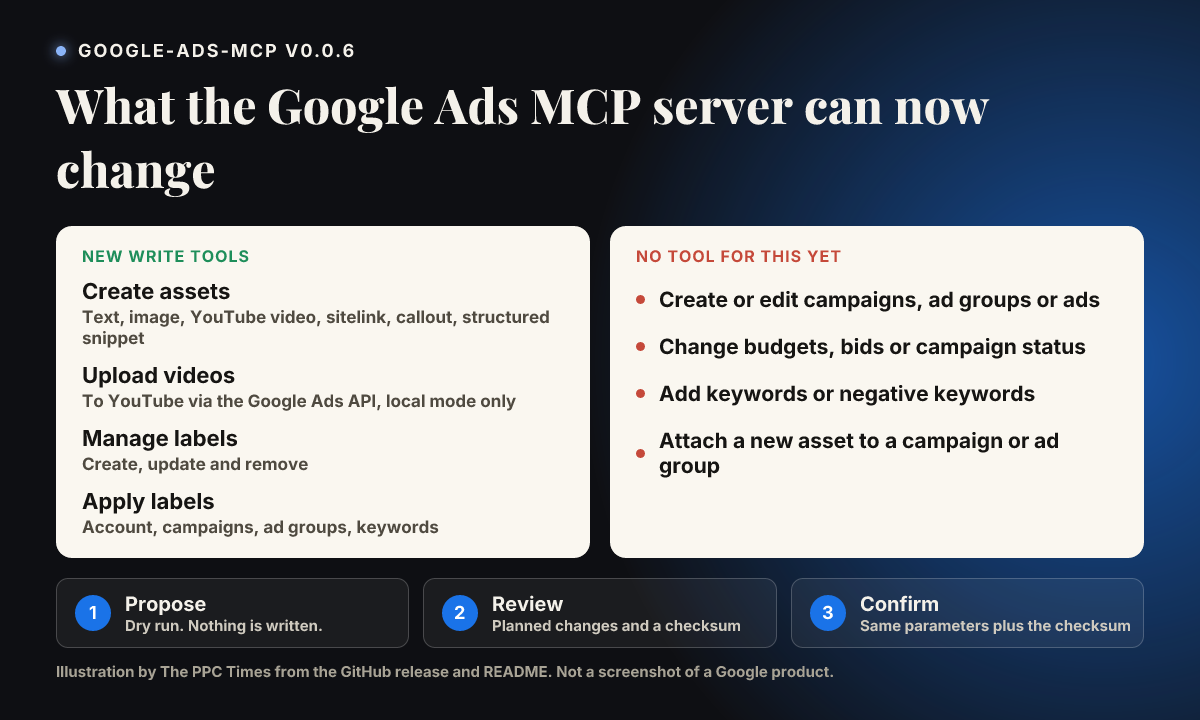
What can the Google Ads MCP server change in version 0.0.6?
Version 0.0.5 only had tools for reading data. The pull request behind 0.0.6 describes the work as initial support for mutate capabilities, the Google Ads API term for changes. The project's README lists four new tools:
create_asset: creates text, image, YouTube video, sitelink, callout and structured snippet assets. Other asset types go through an extra parameter.upload_video_asset: uploads a local video to YouTube through the Google Ads API, in local mode only. Uploads default to unlisted.manage_labels: creates, updates and removes account labels.manage_label_associations: adds or removes labels on the account, campaigns, ad groups and ad group criteria such as keywords.
The read tools remain: GAQL queries, a list of accessible accounts and field metadata.
Wismer's report lists what the server still can't do: create or edit campaigns, ad groups or ads, change budgets, bids or status, or add keywords and negative keywords. Our reading of the 0.0.6 code also found no tool that attaches a new asset to a campaign or ad group, so a new sitelink stays in the asset library until someone links it.
Propose & Confirm applies to every write tool, in two calls:
- The first call runs as a validation only, using a Google Ads API dry run where supported. It returns a readable list of planned changes and a checksum.
- The second call must repeat the same parameters and customer ID and include that checksum. A missing or mismatched checksum is rejected before anything changes.
The checksum ties the write to what was validated. It doesn't prove a person agreed: the README says the second call follows explicit user approval, but Wismer points out that the server has no way to check whether a human approved it.
Google's documentation has not caught up. The developer guide, last updated on October 30, 2026, before the release, says: "This implementation is strictly read-only." Wismer reports that Google had not announced the change as of November 9, 2026, and we found no post about it on the Google Ads Developer Blog.
Why it matters for advertisers
The default setting is the part most likely to catch teams out. Google's own setup examples install from the repository without a pinned version, so a read-only assumption based on the developer guide could now be wrong after an update.
The practical risk looks limited for now, because new assets aren't attached to anything and the server has no tool for budgets or bids. Labels deserve more care: if your automated rules, scripts or reports depend on them, a wrong label change could have effects outside the label itself.
For agencies, routine work such as building sitelink and callout libraries or labelling campaigns could move into an AI assistant. The confirmation step is only as strong as the client it runs in, so that is the part to check.
What to do now
- Check your version: if you run the Google Ads MCP server from the repository, you may already have the write tools.
- Stay read-only if you prefer: set
labels: falseandassets: falseintools_config.yaml. PointGOOGLE_ADS_MCP_TOOLS_CONFIGat the file if it isn't in the working directory. - Pin a version: the README shows how to run one exact release, so new tools arrive only when you choose.
- Add your own approval step: Wismer uses a Claude Code hook that asks him before each confirmed write. Consider something similar in your own client.
- Test on a low-risk account: create one label or sitelink, then confirm the result in Google Ads.
- Check client agreements: review them before giving an AI tool write access to client accounts.