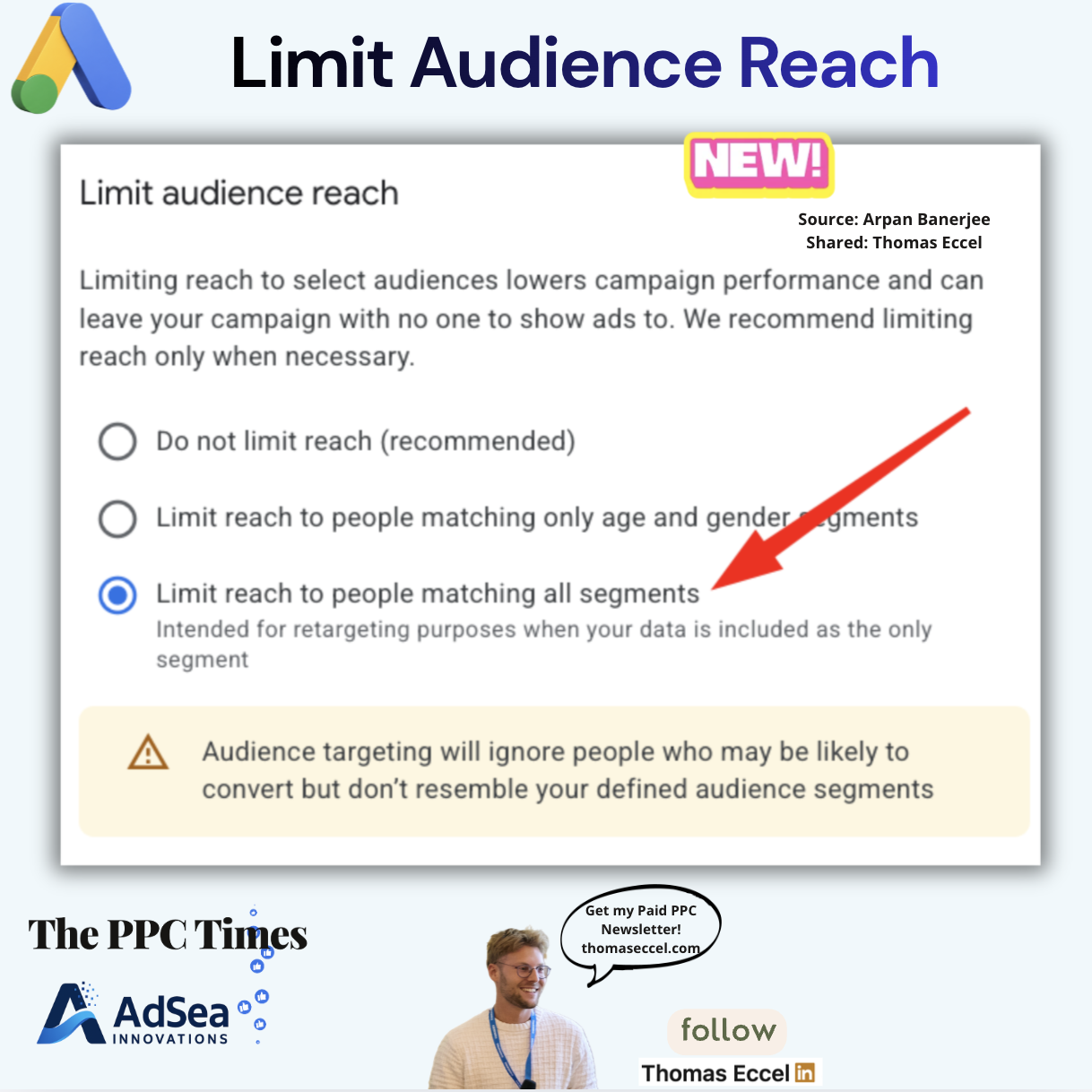
A setting called "Limit audience reach" has been spotted in Google Ads, according to a screenshot credited to Arpan Banerjee, who shared it on X, and passed on by The PPC Times editor Thomas Eccel on November 12, 2026. The Google Ads 'Limit audience reach' setting lets advertisers choose whether ads may reach people outside the audience segments they selected. Google has not announced the setting, and we could not find a Google Ads Help page that describes it, so treat the details below as unconfirmed.
What does the 'Limit audience reach' setting in Google Ads do?
The screenshot shows a panel titled "Limit audience reach" with three options:
- Do not limit reach (recommended)
- Limit reach to people matching only age and gender segments
- Limit reach to people matching all segments, which the panel describes as meant for retargeting when the advertiser's own data is the only segment
Above the options, the panel warns that limiting reach lowers campaign performance and can leave a campaign with nobody to show ads to, and recommends it only when necessary. With the third option selected, a yellow warning box says audience targeting will then ignore people who may be likely to convert but do not resemble the advertiser's defined segments.
The screenshot does not show which campaign type the panel belongs to, which accounts have it, or when it appeared. We could not read the original X post, so we cannot add those details from it either.
Why it matters for advertisers
The wording of the panel suggests that, with the default option, Google Ads treats selected audiences as a starting point rather than a hard limit, and that advertisers have to opt in to keep ads inside their segments. That reading is ours, based on the labels in the screenshot.
It would fit a direction Google has documented for Demand Gen. Google's help page on Lookalike segments in Demand Gen says the default behaviour for Lookalike segments "will evolve towards a suggestion mode", and that advertisers can keep the original behaviour as a Targeting Constraint by opting out. Whether the 'Limit audience reach' panel is connected to that change is not confirmed.
For remarketing campaigns, the difference could be large. If a campaign meant for past visitors or customers runs on the default option, it is likely to reach people outside those lists, which could change both cost and the meaning of remarketing results. The third option's description points to that use case directly.
The middle option, which limits only on age and gender, could be useful for advertisers with legal or product reasons to stay within certain demographics while still letting Google look beyond their other segments.
What to do now
- Check your campaign settings. Look in the audience section of your campaigns for a "Limit audience reach" panel and note which option is selected. If you don't see it, it may not have reached your account.
- Review remarketing campaigns first. If a campaign should only reach your own lists, check whether "Limit reach to people matching all segments" fits and is selected.
- Watch reach and audience reports after any change. Limiting reach could cut impressions sharply; Google's own panel warns it can leave a campaign with no one to show ads to.
- Compare before switching everything. Where volume allows, test the default option against a limited one rather than changing all campaigns at once.
- Look for an official note. Until Google documents the setting, the option names and behaviour could change.