Google Ads advertisers can change customer retention settings on several campaigns at once through an "Update customer retention" panel, according to a LinkedIn post by Bia Camargo shared on November 11, 2026. The panel covers bidding for existing, high-value and lapsed customers and two loyalty program settings. Google has not announced the panel as a new feature, but its help page on customer retention for loyalty program members says changes to benefits and bidding can be made for multiple campaigns using bulk edits. The settings matter mostly to retailers running Performance Max or Shopping campaigns.
How does the Google Ads customer retention bulk edit work?
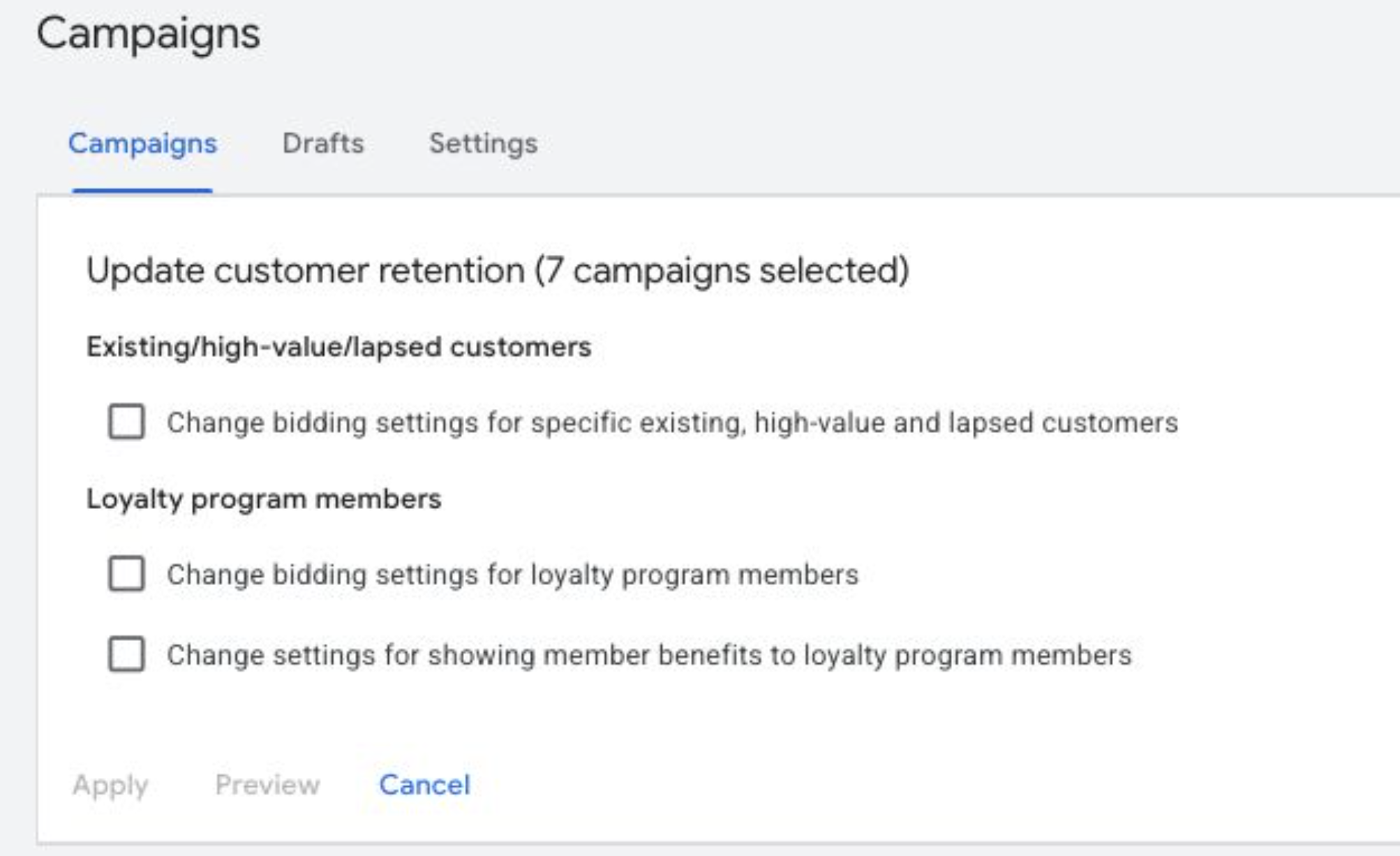
The screenshot shows the Campaigns page with a panel titled "Update customer retention (7 campaigns selected)" and three checkboxes under two headings:
- Existing/high-value/lapsed customers: change bidding settings for specific existing, high-value and lapsed customers.
- Loyalty program members: change bidding settings for loyalty program members.
- Loyalty program members: change settings for showing member benefits to loyalty program members.
The panel has Apply, Preview and Cancel buttons, so changes can be checked before they go live on the selected campaigns.
Google's help pages describe the settings the panel edits:
- Eligible campaigns: customer retention for loyalty program members is available in Performance Max and Shopping campaigns, according to Google's About customer retention page. The loyalty page specifies Performance Max campaigns with a linked Google Merchant Center account.
- Bid strategies: the loyalty settings work with Maximize conversions with a target CPA and Maximize conversion value with a target ROAS.
- Member lists: advertisers upload loyalty members through Customer Match and can split them into up to seven loyalty tiers for bidding and reporting.
- Member benefits: the benefits setting shows loyalty program benefits, such as price and shipping, on Shopping ads. The benefits themselves are added in the Merchant Center feed.
- Opt-in: campaigns that already use Member Price or Member Shipping annotations are not enrolled in Loyalty Mode automatically. Google says advertisers must opt in manually to use targeted bidding and tiered reporting.
We could not confirm when the bulk panel appeared or whether it is available in every account.
Why it matters for advertisers
Retention and loyalty settings are set per campaign. For a retailer with many Performance Max or Shopping campaigns, turning loyalty bidding on or changing how returning customers are valued has meant opening each campaign's settings one at a time. A bulk panel could cut that to a single change and make it less likely that one campaign is left on different settings from the rest.
The flip side is that one click can now change bidding across many campaigns. Bidding higher for existing or loyal customers shifts spend towards people who may have bought anyway, so applying it to every campaign without checking each one's goal could move budget away from new customer growth.
What to do now
- Select a few Performance Max or Shopping campaigns on the Campaigns page and check whether an "Update customer retention" option appears in your account.
- Before applying, use Preview to check which campaigns will change, and leave out campaigns built for new customer acquisition.
- If you plan to use the loyalty options, check that your Customer Match member lists are current and that member benefits are set in Merchant Center.
- Campaigns using Member Price or Member Shipping still need a manual opt-in to Loyalty Mode, according to Google, so check their status after a bulk change.