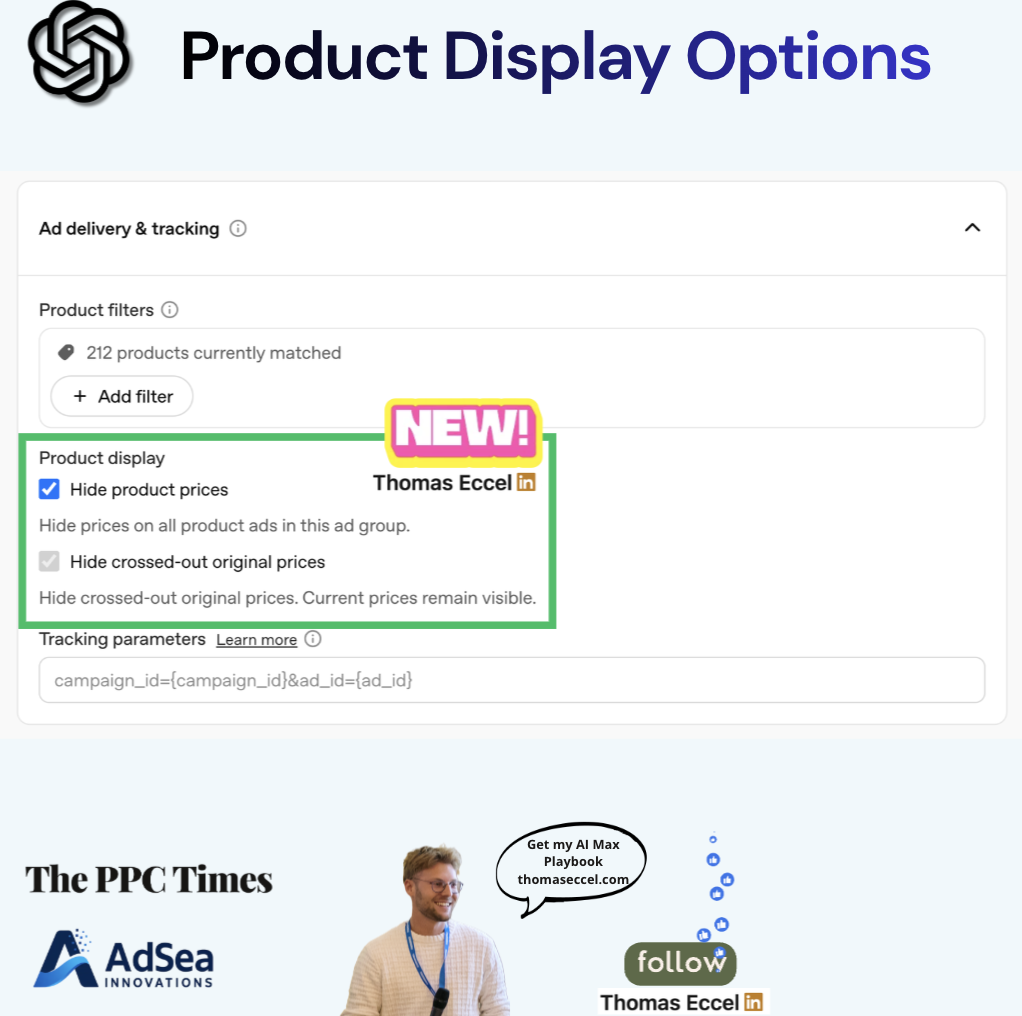
ChatGPT Ads now shows a Product display section with two price settings for product ads, according to a screenshot of Ads Manager by Thomas Eccel, editor of The PPC Times. One hides prices on all product ads in an ad group, the other hides crossed-out original prices. As of November 23, 2026, OpenAI's help article on product feed campaigns and its product feed schema don't mention either setting.
How do the ChatGPT Ads product display settings work?
In the screenshot, Product display sits in the ad group's "Ad delivery & tracking" section, between Product filters and Tracking parameters. The settings apply to the ad group, not to single ads. There are two checkboxes:
- Hide product prices: according to its description, it hides prices on all product ads in the ad group.
- Hide crossed-out original prices: the interface says current prices remain visible.
In the screenshot, Hide product prices is ticked, and the crossed-out price option is shown ticked and greyed out. With every price hidden, there is no original price left to cross out.
The crossed-out price comes from the product feed. OpenAI's feed schema defines price as the "Regular item price in major currency units". The optional sale_price field is the current sale price. It must be greater than zero, strictly less than price and in the same currency, or it isn't used. OpenAI's help article says product ads can feature product images, titles, stars, prices, sales prices and the brand.
The schema also says sale-window, expiration and availability dates don't schedule price or availability changes. Advertisers have to update current prices in the feed when a sale starts or ends.
Why it matters for advertisers
OpenAI's documentation describes prices and sale prices as part of product ads, so these options change what shoppers see. Hiding prices could suit brands that sell on quality rather than price, products that cost more than rivals, or items whose price needs explaining, such as configurable or business products. The aim would be to earn the click in the conversation and show the price on the landing page.
Hiding only the crossed-out price is a smaller step. It keeps the current price but drops the discount signal, which could help brands that don't want to appear permanently on sale.
Because the settings work per ad group and ad groups are defined by product filters, advertisers could set up two ad groups with different price settings for comparable products and compare their results. Because the settings are undocumented, their exact behaviour could change.
What to do now
- Check your ad groups: open an ad group in a product feed campaign and look for Product display under Ad delivery & tracking.
- Audit sale prices: make sure
sale_pricevalues are current, since the feed doesn't end sales on a date. An expired sale price can keep showing a discount. - Decide per product set: consider hiding prices only where price is a weak argument, and keep them where you are competitive.
- Test before rolling out: compare click-through and conversion rates between ad groups with and without prices before changing your whole catalog.