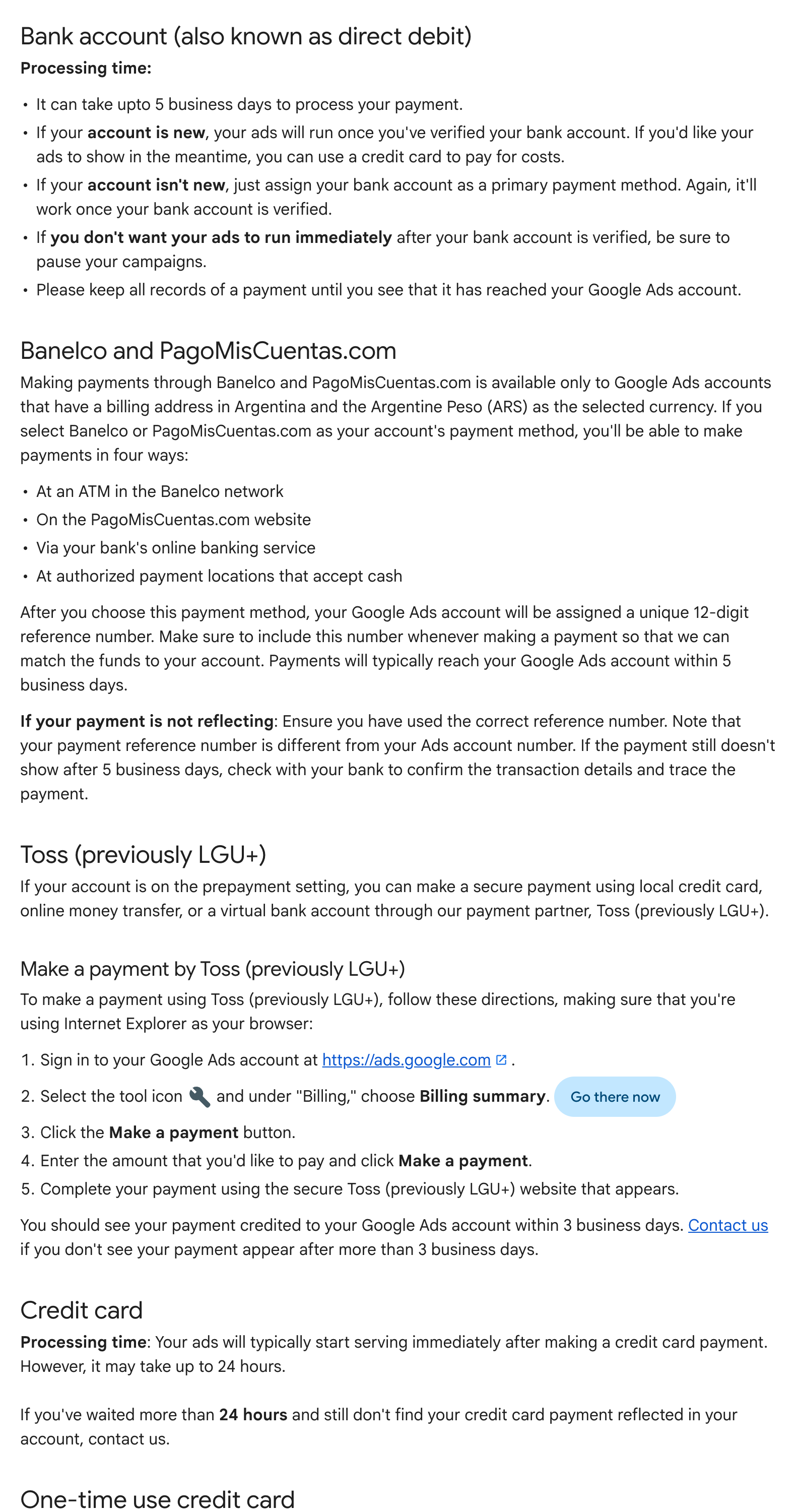
Google updated its Google Ads Help page About payment processing times, and The PPC Times detected the change on November 27, 2026. The page now lists the payment partner Toss (previously LGU+) and gives new processing times and support-contact thresholds for bank account payments, Banelco and PagoMisCuentas.com, money transfers and NetBanking. The update is most relevant to Google Ads advertisers on manual payments or prepayment, who wait for a payment to post before ads run. The page does not say when Google made the change.
What changed in Google Ads payment processing times?
Google Ads payment processing times are now different for the payment methods listed in the table below. The table is a comparison of the Google Ads Help wording before and after the November 27, 2026 update. Toss and the ChinaPay NetBanking section are slower than before; the other NetBanking section is faster.
| Payment method on the page | Before | Now |
|---|---|---|
| Bank account (direct debit) | several days | up to 5 business days |
| Banelco and PagoMisCuentas.com | within 3 to 5 business days | within 5 business days |
| Toss (previously LGU+) | credited within 24 hours | credited within 3 business days |
| NetBanking (one section) | balance typically updates within 48 hours | within 24 hours |
| NetBanking (section asking for ChinaPay proof of payment) | up to one business day | up to 2 business days |
| Money transfer (several sections) | 2 to 5 or 2 to 3 business days | 5 business days |
The Toss section applies to accounts on the prepayment setting. Toss is the Google Ads payment partner for local credit card, online money transfer or virtual bank account payments, according to the page. Banelco and PagoMisCuentas.com are available only to accounts with a billing address in Argentina and Argentine Peso (ARS) as the currency.
The Banelco and PagoMisCuentas.com section also now lists authorized payment locations that accept cash as a payment option, where it previously named counters available for cash payments.
When should advertisers contact Google Ads support about a missing payment?
Google Ads support contact thresholds also changed on the page. The page tells advertisers to wait these periods before contacting Google about a payment that has not appeared:
- Toss (previously LGU+): after more than 3 business days (previously after more than one day).
- NetBanking (one section): after 24 hours (previously after 5 business days).
- NetBanking (ChinaPay section): after 2 business days (previously one business day).
- Money transfer: after 5 business days or 10 business days, depending on the section (previously after 2 weeks or one week).
The Google Ads Help page has separate money transfer and NetBanking sections, and the page text does not name the country each section applies to. The limit for a money transfer is still up to 30 days in some sections and up to 10 days in others.
Why do Google Ads payment processing times matter for advertisers?
Google Ads payment processing times decide how long an account on manual payments can sit without funds. A longer stated window for bank account payments or Toss could mean ads stop for longer if a top-up arrives late. The new contact thresholds are also the periods Google support is likely to point to before it looks into a missing payment.
What to do now
- Check which payment method each prepaid account uses and read that method's section on the Google Ads Help page.
- If you pay through Toss (previously LGU+), consider topping up at least 3 business days before the balance runs out.
- Keep proof of payment until the funds show in the account, as the page asks.
- Update internal billing checklists that still quote the old times or the LGU+ name.