Google updated three Google Ads Help pages on AI Max for Search campaigns between November 25 and 26, 2026, according to The PPC Times help page watcher. Text guidelines now appear in the list of AI Max features. A new answer explains how to block unwanted search terms, landing pages and ad copy while keeping AI Max on. A note on URL exclusions now spells out what they don't cover. The changes are relevant to advertisers running AI Max in Search campaigns.
What are text guidelines in AI Max for Search campaigns?
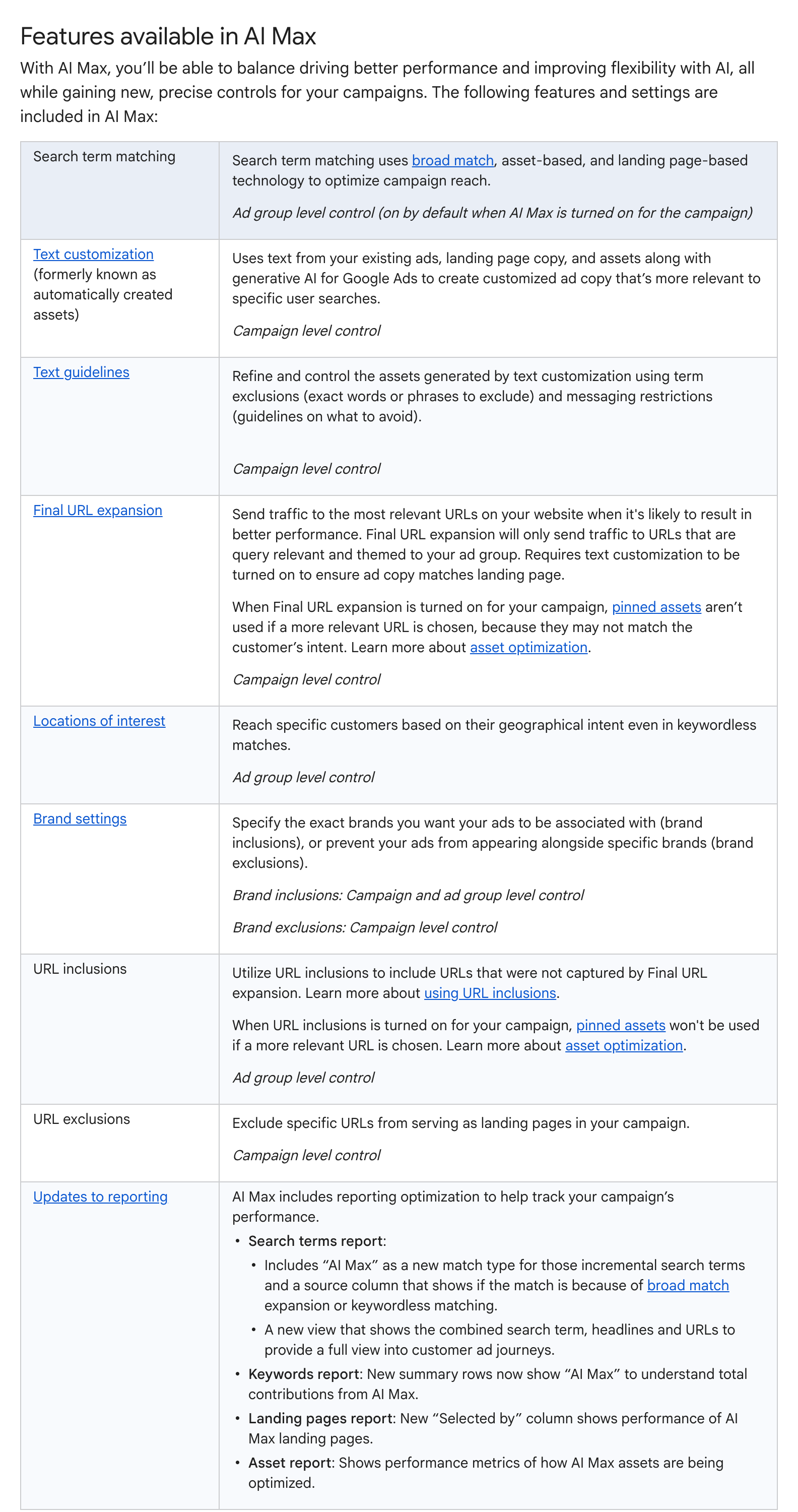
Text guidelines in AI Max for Search are a campaign level control for ads created by text customization, according to How AI Max for Search campaigns works. Text customization is the AI Max setting formerly known as automatically created assets. Text guidelines have two parts:
- Term exclusions: exact words or phrases to exclude.
- Messaging restrictions: guidelines on what to avoid.
The page Turn text customization on or off in Search campaigns now has a matching note: advertisers who want to turn off text customization because of unwanted ad copy can use text guidelines or remove individual assets instead. The same page adds a tip for bulk removal: in Assets, filter by Added by: Google AI, select the assets and select Remove.
The text customization page no longer includes the legacy automatically created assets instructions. It also dropped a note saying that turning off text customization would turn off Final URL expansion. The AI Max page still says Final URL expansion requires text customization to be turned on.
How can advertisers control AI Max without turning it off?
AI Max for Search has targeted controls that work while AI Max stays on, according to the new answer on the AI Max help page. Google lists these controls:
| What to block | AI Max control named on the help page |
|---|---|
| Unwanted search terms | Negative keywords (account, campaign or ad group level), campaign level brand exclusions, or turning off Search term matching for an ad group |
| Specific landing pages | URL exclusions under Campaigns > Settings > AI Max |
| Unwanted ad copy | Text guidelines, or removing individual assets from the Assets table |
The answer says advertisers don't need to switch from Smart Bidding to Manual CPC to control individual queries, pages or assets.
What do AI Max URL exclusions not cover?
AI Max URL exclusions apply only to landing pages that Final URL expansion selects automatically, according to About Final URL expansion in Search. Active responsive search ads with static final URLs and manual sitelinks that point to an excluded URL still serve until they are updated or removed. The page now also says the URLs tab takes exact URLs, while the Rules tab excludes groups of URLs, such as URL contains.
Why do the AI Max control changes matter for Search advertisers?
Search term matching, text customization and Final URL expansion are all listed as features of AI Max on the Google Ads Help page. The new AI Max guidance points to narrower fixes for each one, which could let advertisers keep the reach of AI Max while removing specific problems.
The AI Max URL exclusion note could matter most in practice. An excluded URL in an AI Max campaign may still get traffic from an ad or sitelink that links to it directly, which could look like the exclusion isn't working.
What to do now
- Add text guidelines to AI Max campaigns where generated copy has used terms or claims you don't want, before considering turning text customization off.
- Review generated assets in bulk with the Added by: Google AI filter in Assets.
- Check excluded URLs against static final URLs in your ads and manual sitelinks, and update those separately.
- Use rules in the URL exclusions panel for groups of pages, and the URLs tab for exact pages.