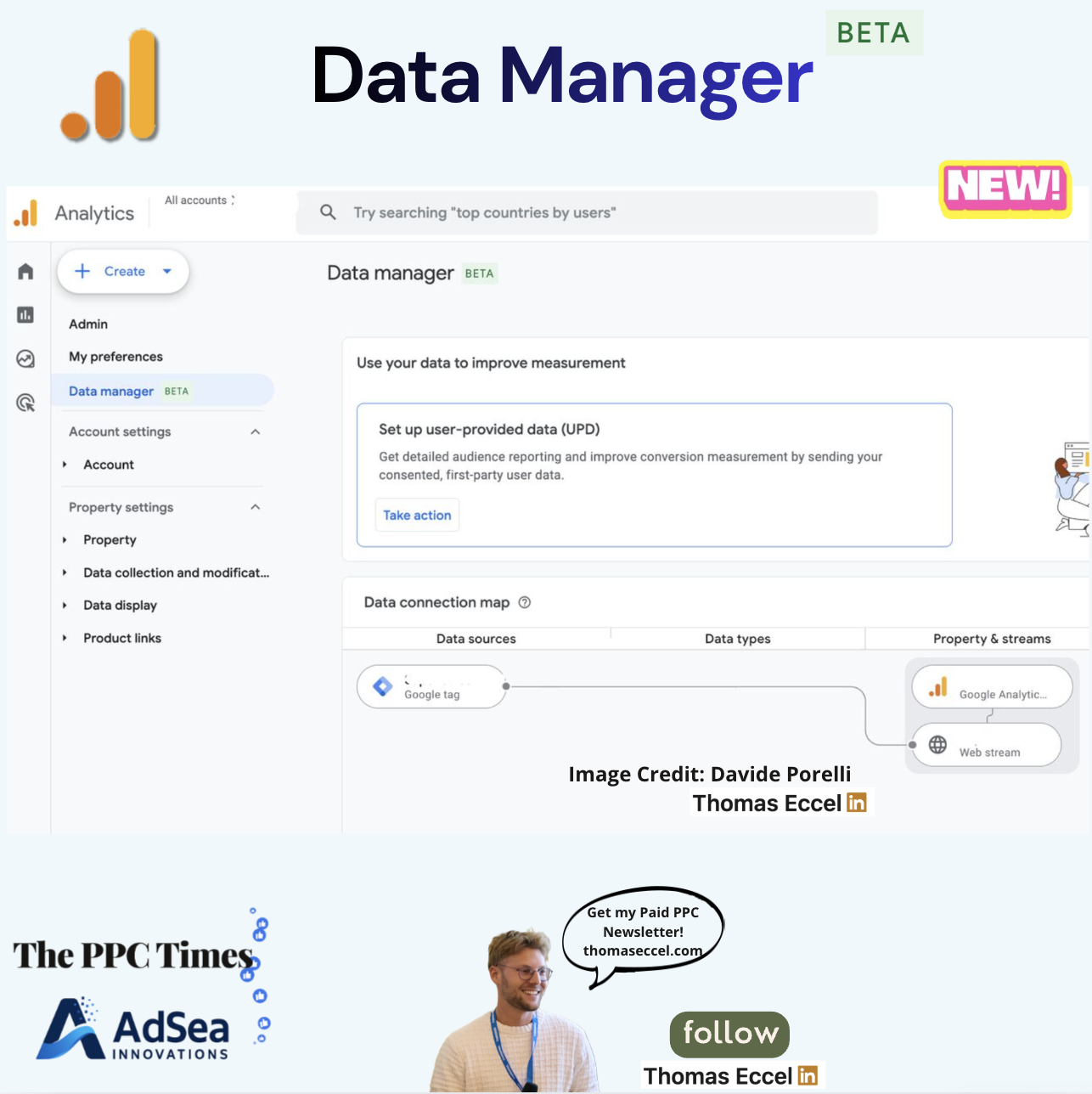
A Data manager section marked "Beta" has been spotted in the Admin area of some Google Analytics 4 properties, according to a LinkedIn post by PPC Times editor Thomas Eccel. The page brings a property's data sources, streams and links into one view, with a diagram of how data moves between them. Google has not announced the feature: there is no entry for it in the GA4 release notes at the time of writing, so it is not clear which properties have it or when it will reach everyone.
What's changing
In the screenshot, Data manager sits in the GA4 Admin menu directly below "My preferences", above the account and property settings. The page has two parts.
The first is a card titled "Use your data to improve measurement". It invites the user to set up user-provided data (UPD), which the card describes as sending "consented, first-party user data" to get more detailed audience reporting and better conversion measurement.
The second is a "Data connection map" with three columns: data sources, data types, and property and streams. In the example shown, a Google tag connects to a Google Analytics property and its web stream.
According to the LinkedIn post, the section also covers:
- data sources such as Google Tag Manager, CRMs, Google Ads links and offline files
- data imports and their types
- web and app streams
- exports to the products that receive GA4 data
The post says broken connections are shown in red with an option to fix them. The screenshot does not show a broken connection, so we have not seen that part ourselves.
Google Ads already has a similar view. Its Data Manager help page describes a map view that links data sources to the destinations where the data is used, mainly conversion actions, and shows connection status. That page does not mention Google Analytics.
Why it matters for advertisers
GA4 data feeds Google Ads bidding for many accounts through imported conversions and audiences. Today, checking that setup means visiting several Admin screens: streams, data import, product links and data collection. One map of sources, streams and destinations could make it quicker to spot a missing link or a stream that has stopped sending data before it affects campaigns.
The placement of the user-provided data card at the top of the page suggests Google wants more properties to send first-party data. Advertisers who use GA4 conversions in Google Ads may see this prompt more often. Turning it on is a decision for whoever owns the property's consent setup and privacy policy, not only the paid search team.
Because the feature is in beta and unannounced, its layout, scope and name could change before a wider release.
What to do now
- Check the Admin menu in your GA4 properties for a Data manager entry below My preferences. If it is there, compare the map with what you expect to be connected.
- Use the map as a checklist for links that matter to Google Ads: the Google Ads link, imported conversions and any offline or CRM imports.
- Before acting on the user-provided data prompt, confirm with your legal or privacy owner that your consent collection covers it.
- If you don't see the section yet, keep auditing links and imports in the existing Admin screens. Watch the GA4 release notes for an official announcement.