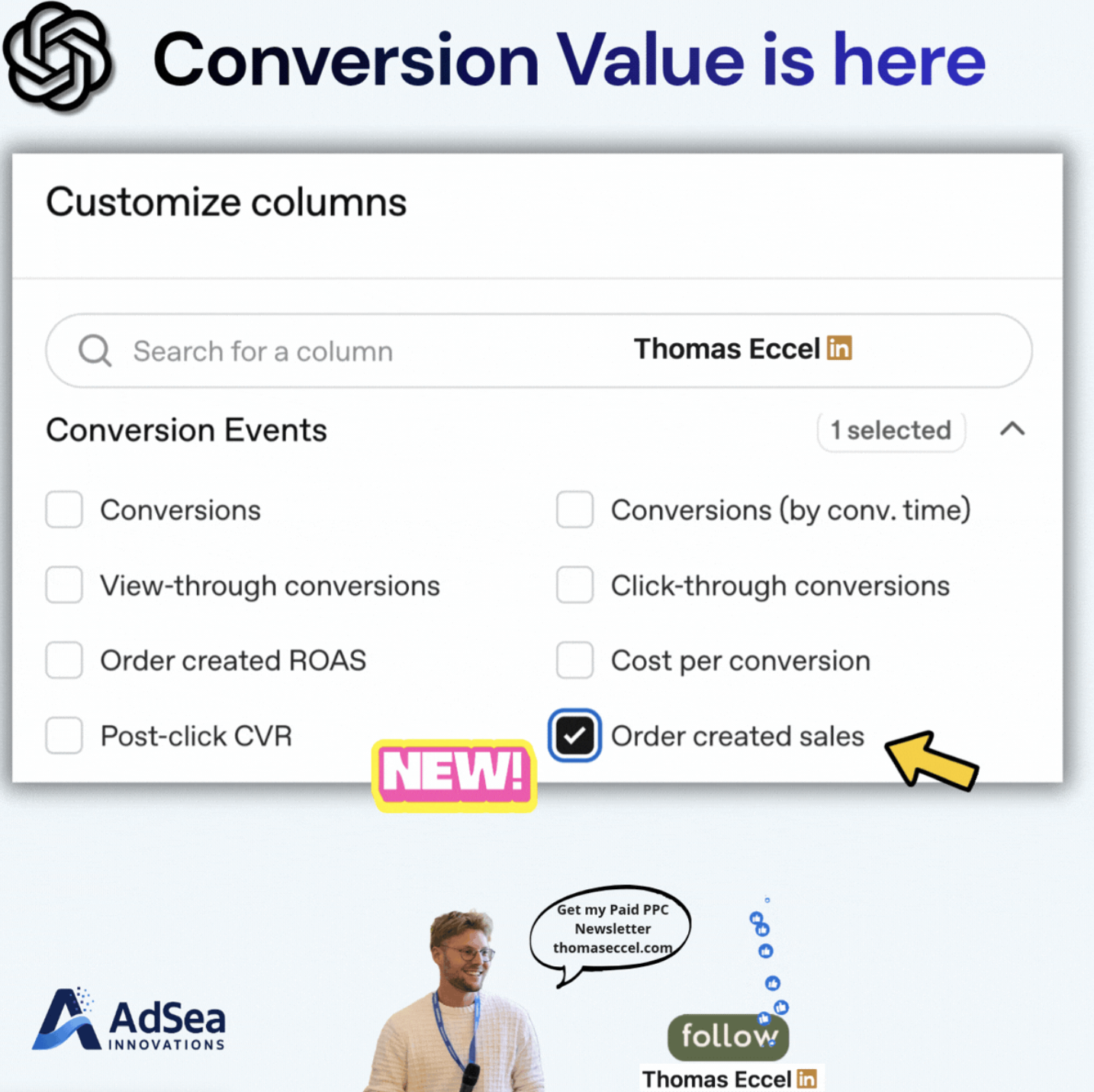
Advertisers on ChatGPT Ads can now report on the value of purchases, not just their number. A column called "Order created sales" appears in the Customize columns panel of ChatGPT Ads Manager, next to "Order created ROAS", as shown in a LinkedIn post by Thomas Eccel, editor of The PPC Times. We did not find a separate OpenAI announcement for the new columns. The underlying metrics are described in OpenAI's Ads reporting documentation. The change matters most to ecommerce advertisers who send purchase events with a value.
What's changing
The screenshot shows a Conversion Events section in the column picker with eight options: Conversions, Conversions (by conv. time), View-through conversions, Click-through conversions, Order created ROAS, Cost per conversion, Post-click CVR and Order created sales. Order created sales is the column marked as new.
OpenAI's reporting documentation lists two purchase metrics. "Attributed sales" (order_created_attributed_sales) is the value of attributed purchase events, in the ad account's currency. "Return on ad spend" (order_created_roas) is attributed purchase value divided by spend, so a value of 4 means four units of sales per unit of spend. The documentation does not use the Ads Manager labels, so matching the two columns to these metrics is our reading of the field names, not something OpenAI states.
Both numbers rely on the data advertisers send. In OpenAI's words, "These purchase metrics depend on the values supplied with order_created events." The documentation also says ROAS can be unavailable when purchase value is missing or spend is zero, and that a null value means the metric cannot be calculated, not that it is zero.
Attribution settings change the figures too. According to the reporting documentation, the click window can be 7, 14 or 30 days (30 by default), the view-through window can be 0 or 1 day, and these settings affect sales and ROAS as well as conversions. By default, results are dated by the ad interaction rather than the conversion. OpenAI advises allowing at least one day for conversion data to appear.
Bidding has not changed. OpenAI's bidding and budgets page lists three bid strategies: Fixed bid, Maximize clicks and Maximize conversions. Maximize conversions optimizes toward the campaign's selected conversion event, and the page does not mention conversion value, target ROAS or a maximize conversion value option.
Why it matters for advertisers
Until now, comparing ChatGPT Ads with Google Ads or Meta Ads on return was hard without exporting order data and joining it by hand. A ROAS column in Ads Manager could make that first comparison quicker, at least for accounts that already pass order values.
The numbers are only as good as the order_created setup. An account that fires purchase events without a value, or with the wrong currency or amount, is likely to show missing or misleading ROAS. Because the default window counts conversions up to 30 days after a click plus 1 day after a view, ChatGPT Ads ROAS may also not line up with a Google Ads account that uses different windows.
Reporting on value is often a step before bidding on value, but OpenAI has not announced value-based bidding. For now, campaigns optimize for conversion volume, so a high-value order and a low-value order count the same toward bidding.
What to do now
- Open Customize columns in ChatGPT Ads Manager and check whether Order created sales and Order created ROAS appear in your account. Availability may differ between accounts.
- Check that your Pixel or Conversions API
order_createdevents send a purchase value and currency. Compare a few days of Order created sales with your shop's own order data. - Before comparing ROAS with other platforms, note the click and view windows you are using and match them where you can, as OpenAI's documentation recommends when comparing reports.
- Keep judging campaigns on your own margin data. A Maximize conversions campaign does not see order value, so watch ROAS by campaign and shift budget by hand where return differs.