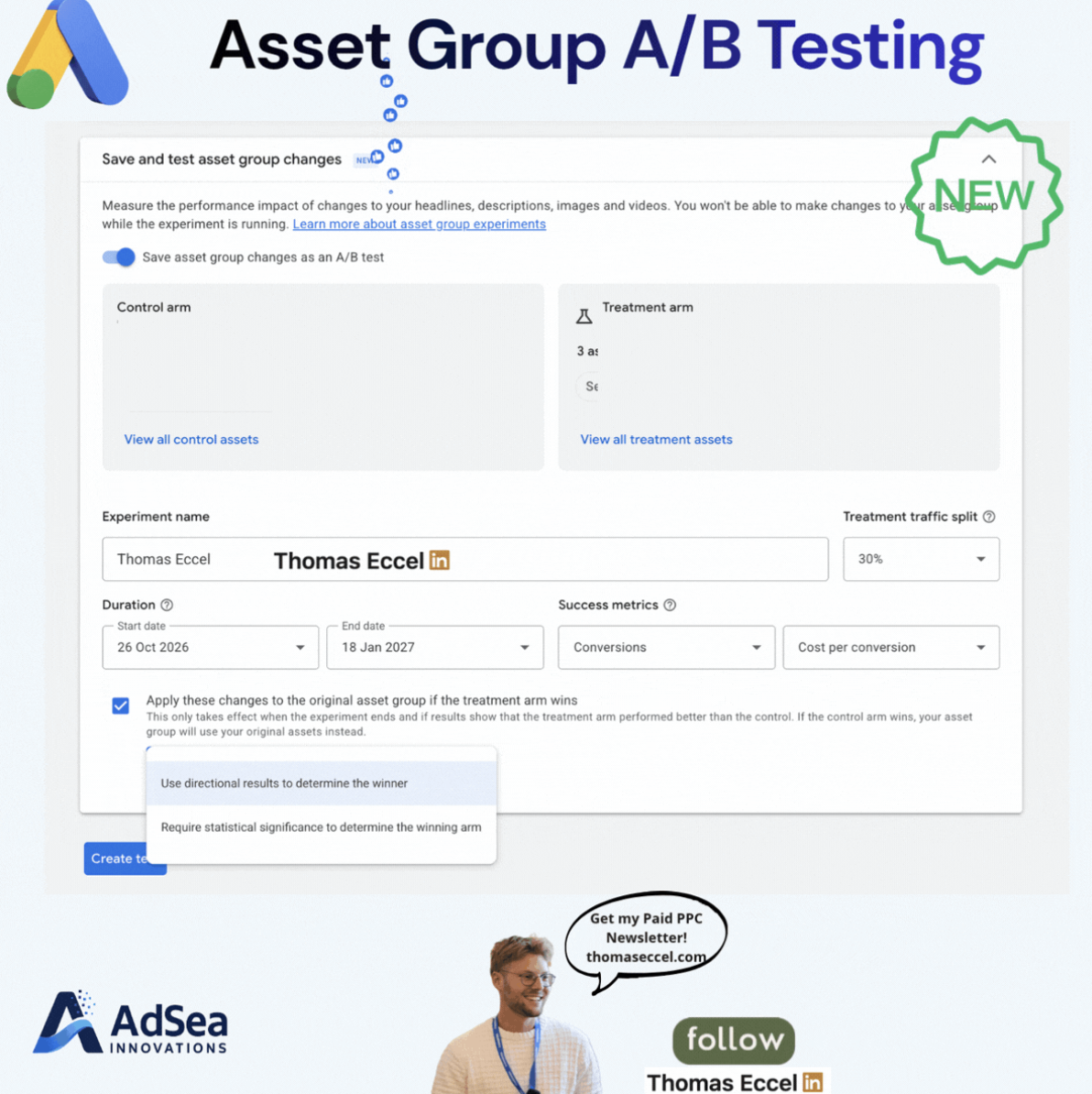
Google Ads advertisers can now test new headlines, descriptions, images and videos in a Performance Max asset group against the assets already running, without building a separate campaign. According to Google's help article, the feature is a beta that splits traffic between a control set and a treatment set of assets inside a single asset group. Besides the Experiments page, it can now be started straight from the asset group editor, as Thomas Eccel showed in a LinkedIn post with a screenshot from an account.
What's changing
Google's help article describes two ways to set up the test. The first goes through the Experiments menu: create an Assets experiment, choose Performance Max, pick the campaign and asset group, then select or upload the treatment assets. The second starts in the asset group itself. After editing assets, advertisers open a panel called "Save and test asset group changes" at the bottom of the page and turn on the toggle "Save asset group changes as an A/B test". The Save button then becomes "Create test".
The test has three kinds of assets:
- Control (A): the existing assets, used as the reference.
- Treatment (B): the assets being tested, either existing ones or new uploads.
- Common assets: anything not assigned to either arm. Google says these "will continue to serve normally to 100% of your campaign's traffic".
Advertisers set the traffic split between the arms and review the experiment name, duration and success metrics. The end date is suggested by what Google calls the Experiment Guidance System, and the help article recommends running the test for a minimum of 4 to 6 weeks. A checkbox, on by default, applies the treatment assets to the original asset group if the treatment arm wins. If the test is ended instead, new treatment assets are discarded and the asset group goes back to its original state.
Thomas Eccel's screenshot also shows a choice between using directional results to pick the winner and requiring statistical significance. Google's help article does not explain that setting.
The help article lists several limits:
- Assets in the tested asset group can't be edited, added or removed until the experiment ends.
- Only one asset group can be tested per experiment.
- Control and treatment assets both count toward the asset group's asset limits.
- New treatment assets go through policy review, and disapproved assets won't serve in the experiment.
- Experiments can't be created for campaigns with a shared budget, a portfolio bidding strategy or Smart Bidding Exploration, or when another experiment is running or scheduled for the same dates.
Google's help article does not give a rollout date or say which accounts have the beta.
Why it matters for advertisers
Comparing performance before and after an asset swap mixes the creative change with everything else that changed over those weeks. A split inside one asset group is likely to give a cleaner read, because both arms run in the same campaign over the same dates.
Putting the toggle in the asset editor could also change habits. Creative refreshes that used to be pushed live directly can now be saved as a test with a few extra clicks, which is likely to make testing the default for larger asset changes.
The asset lock is the main trade-off. For 4 to 6 weeks, the tested asset group can't be changed, which could clash with seasonal promotions or urgent creative updates. Accounts with low conversion volume may also struggle to reach a clear result in that time.
What to do now
- Check access. Open an asset group in a Performance Max campaign, go to Edit assets, and look for the "Save and test asset group changes" panel. If it isn't there, the Experiments menu route may still be available.
- Check eligibility first. Campaigns with shared budgets or portfolio bid strategies can't run the test, so plan any budget changes before you start.
- Plan around the lock. Avoid starting a test right before a sale or launch that needs new assets in the same asset group.
- Leave room for treatment assets. Since both arms count toward the asset group limits, a full asset group may need some cleanup first.
- Pick the decision rule on purpose. If your account shows the directional versus statistical significance option, consider requiring significance for changes you plan to roll out widely.